Product

Bookkeeping work, invoices, and cash flow in one workspace.

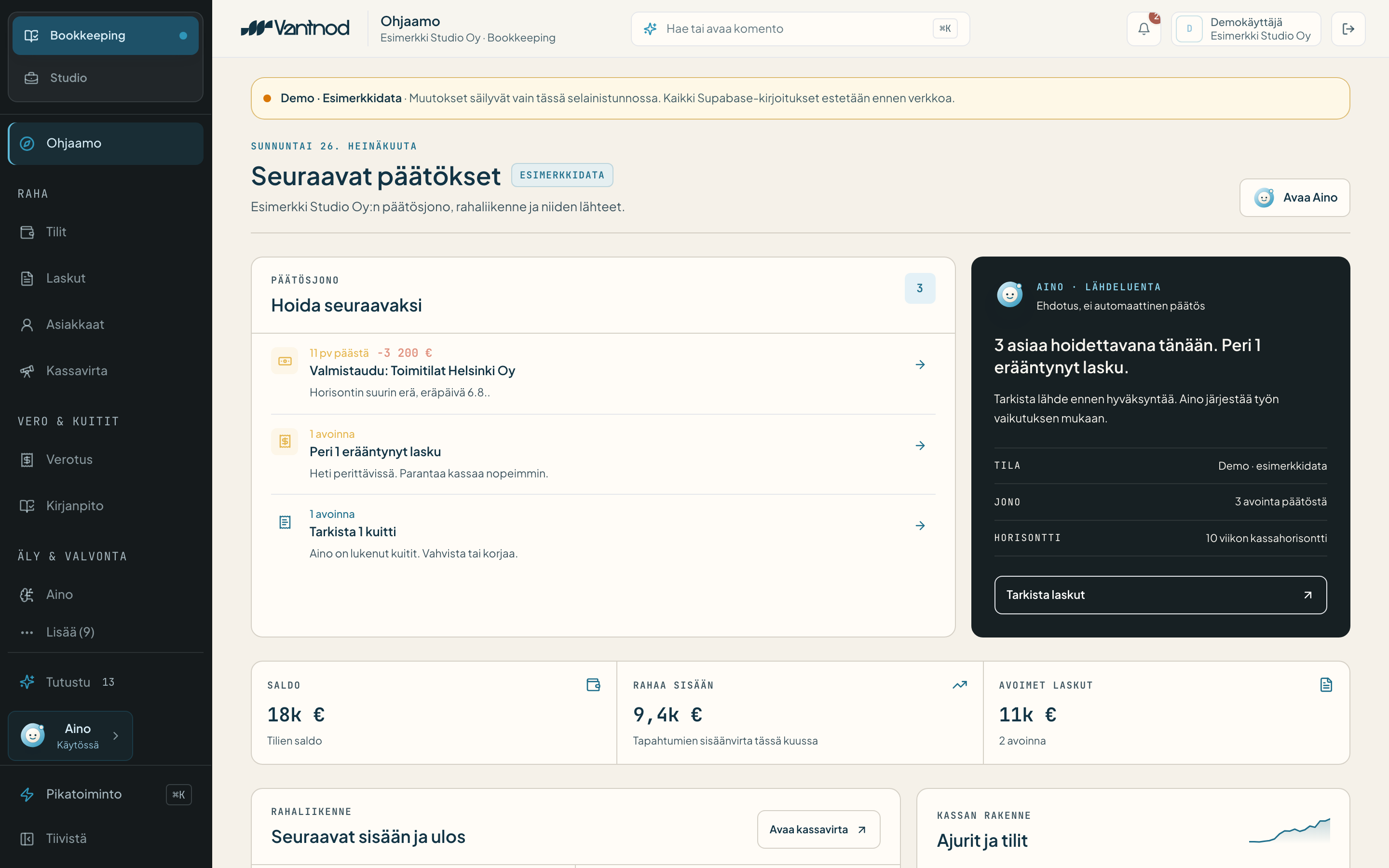
Vantnod brings a company's everyday finance into one cockpit: invoices, receipts, bank transactions, cash flow, accounting material, and the decisions that still need a person.

You see what happened, what Noa suggests, what is waiting for approval, and how a decision affects cash, reporting, or the material going to the accountant.

Finance does not stay in control on a monthly report alone. It stays in control when source, explanation, decision, and impact are visible in the same workspace.

01Source

Bank, invoice, or receipt

02Decision

Waiting for a person

03Impact

Cash, report, and export

04Noa

Suggests and explains

05Audit

Leaves a verifiable trail

EU-first data model · Noa shows sources · Audit trail from day one · AI and human kept separate

Product core

01 / 14

Finance is not only a report. It is work that happens every day.

A company's finance does not live only at the end of the month. It lives in invoices, receipts, bank transactions, open receivables, VAT signals, approvals, missing documents, and the moment when the founder has to decide what comes next.

Often the information is already there. It is just in the wrong place, too late, or too detached from the decision.

Vantnod's job is to make finance work visible before it becomes a problem. It shows what came in, what needs to go out, what is waiting for a check, what Noa suggests, and how a decision affects cash or reporting.

Not just a dashboard. Not just a report folder. A workspace where everyday finance moves.

Workspace

02 / 14

Daily finance work fits in one view.

Vantnod is built from rows, queues, and decisions you can actually use day to day. Its job is not to drown the user in charts, but to show what to understand, check, or do next.

  1. [01]

    Invoice and track

    Create invoices, follow their state, and see how open receivables affect cash. An invoice is not just a document, but part of the rhythm.

  2. [02]

    Gather material

    Receipts, purchases, bank transactions, and invoices land in one work queue. Missing material is not invisible.

  3. [03]

    Review entries

    Noa can suggest a treatment, classification, or explanation, but a critical change waits for human approval.

  4. [04]

    Follow cash

    See today's state, open invoices, upcoming payments, and the cash impact of decisions without rebuilding the view in Excel.

  5. [05]

    Share with the accountant

    Roles, sources, approvals, and exports make collaboration more verifiable. The accountant needs better material, not more noise.

Vantnod · WorkspaceToday

Expense €120.00

receipt #214Noa proposes

Software subscription €29.00

bankrecurring

Travel expense €56.00

receipt #218Noa proposes
Approval queue3 open

Visible work

03 / 14

Source, decision, and impact move together.

Vantnod's workflow is built on the idea that a finance event does not stay a loose number. Every meaningful event has a source, a possible Noa suggestion, a human decision, an impact, and a trail.

  1. Source

    Bank, invoice, receipt

    A bank event, invoice, receipt, or other document lands in the same work queue.

  2. Noa

    Suggestion and explanation

    Noa can suggest what an event relates to, how to treat it, and where the material looks uncertain.

  3. Human

    Approval

    The user reviews and approves a critical change before it becomes a permanent entry, export, or decision.

  4. Impact

    Cash, report, export

    The effect of the approval shows up in cash, in a report, in the task queue, or in the accounting material.

  5. Audit

    Verifiable trail

    Source, Noa's suggestion, the human approval, and the change history stay verifiable.

This is Vantnod's first principle: finance work must not disappear into automation.

Noa

04 / 14

Noa helps you understand. It does not hide responsibility.

Noa is Vantnod's finance assistant. Its job is to help the user interpret, prioritise, and verify finance events. Noa can help with reading receipts, suggesting expense categories, explaining anomalies, drafting reports, and spotting missing material. But Noa is not an invisible decision-maker.

  1. [01]

    Sources stay visible

    When Noa suggests, the user has to see what the information rests on, whenever possible.

  2. [02]

    Uncertainty stays visible

    If the material is incomplete, conflicting, or open to interpretation, Noa has to surface that.

  3. [03]

    Approval separate

    Noa's suggestion is not the same as a decision approved by a human.

  4. [04]

    Everyday helper

    Noa explains and prioritises, but the user keeps responsibility for critical finance decisions.

Noa can make mistakes. Always verify accounting, tax, invoicing, and payment information before approving.

Command

05 / 14

Find invoices, customers, and tasks without hunting.

Finance work slows down when information exists but has to be hunted across places. The command layer makes the work findable from one surface.

  • Open a customer and their open invoices.
  • See every event waiting for approval.
  • Check this month's VAT signals.
  • Find receipts Noa is uncertain about.
  • See cash impact before a decision.
  • Open the material for the accountant.
⌘K

Find invoices, customers, and tasks without hunting.

AI + human

Suggestion, approval, and change history stay separated.

Today's cash

Cash picture without manual Excel scaffolding.

Invoices

06 / 14

An invoice is not just a PDF. It is an event, a decision, and a cash impact.

In Vantnod an invoice does not stay a loose document. It links to the customer, payment state, cash flow, possible reminders, reporting, and accounting material. The user has to see fast: what was sent, what was paid, what is late, and what needs the next move.

  1. [01]

    Create and track

    Invoices live in the same workspace as the rest of finance.

  2. [02]

    Open receivables

    See which money is still coming and how it affects cash.

  3. [03]

    States and tasks

    An invoice can be waiting for sending, payment, review, a reminder, or export.

  4. [04]

    Link to cash

    Invoicing is not its own island. Its effect shows up in the overall picture.

Receipts and material

07 / 14

Missing material must not surface only at month end.

Receipts, purchases, and documents are often small things that grow into a big mess. Vantnod's job is to make missing, unclear, or pending material visible in time.

  1. [01]

    Receipts in rhythm

    Receipts do not stay loose photos or email attachments.

  2. [02]

    Event and document together

    The link between a bank event, a purchase, and a document stays verifiable.

  3. [03]

    Noa can help interpret

    Noa can suggest what material relates to, but uncertainty is shown.

  4. [04]

    Human approves

    A critical change or interpretation waits for user confirmation.

Document queueMatching

Receipt €42.80

receipt #221bank 12 JunNoa proposes

Purchase invoice €310.00

PDFbank 10 Jun

Document missing €18.50

bank 9 Jun
Missing documents2

Accounting material

08 / 14

The accountant does not need more noise. They need verifiable material.

Vantnod does not try to turn the user into an accountant. Its job is to help gather, explain, and organise finance work so collaboration with the accountant is cleaner. From the accountant's view, the most important thing is not a pretty dashboard. It is that documents, sources, approvals, and changes can be verified.

  1. [01]

    Documents in rhythm

    Receipts, invoices, and events do not stay detached.

  2. [02]

    Sources included

    The document or event tied to an entry stays visible.

  3. [03]

    Roles and rights

    The accountant can be given the right view for the task without managing the whole company.

  4. [04]

    Export and check

    The goal is that material can be exported and verified in a controlled way.

Cash

09 / 14

Cash flow must not be a separate Excel that updates too late.

A company's cash situation is made of small events: invoices sent, open receivables, upcoming payments, purchases, taxes, and approvals. If these live in different places, decisions slow down. Vantnod brings cash into the daily view: where we are now, what is coming, and which decision matters next.

  1. [01]

    Today's state

    See where the finance stands now.

  2. [02]

    Open invoices

    Follow what is paid, what is waiting, and what needs action.

  3. [03]

    Upcoming effects

    Understand how approvals, purchases, and obligations affect cash.

  4. [04]

    Decision calm

    The aim is to help you decide faster, not to produce more reports.

Cash30 days
Cash now€24,300+€1,200
Open receivables€6,400
Upcoming payments−€3,900

Surface

10 / 14

Work does not hide under a dashboard.

Vantnod's interface is not built around charts alone. Charts are useful only after the work behind them is understandable. Vantnod shows the rows, queues, sources, and decisions that everyday finance actually consists of.

  1. [01]

    Work queues

    What is missing, what is waiting, and what to check next.

  2. [02]

    Rows

    Invoices, receipts, events, and entry suggestions stay as workable units.

  3. [03]

    Decisions

    Approval, correction, export, and rejection are part of the same flow.

  4. [04]

    Sources

    A result is not detached. It links to a document, event, or user decision.

  5. [05]

    Commands

    The user moves through work fast without the view turning into a report jungle.

Architecture

11 / 14

One workspace can live alongside other systems.

Vantnod is not a closed box. Financial data often originates in the bank, in invoicing, in payment services, in e-commerce, in accounting software, in email, and in user files. Vantnod brings this into an understandable cockpit.

  1. [01]

    Sources

    Bank, invoice, receipt, Stripe, e-commerce, or another system can be the origin.

  2. [02]

    Channels

    An invoice can travel different routes: e-invoice, Peppol, PDF, or another local channel.

  3. [03]

    Profiles

    Company country, tax treatment, reporting rhythm, and obligations stay separable in the model.

  4. [04]

    Audit

    A change has to leave an understandable history regardless of the source.

Honest scope

13 / 14

Vantnod is not an accounting firm, a bank, or a magic box.

Vantnod is a software platform for improving finance work, decisions, and visibility. It does not replace an accountant, a tax expert, a bank, or the user's own duty to verify. This scope makes the product more trustworthy. Vantnod does not hide responsibility. It makes it visible.

  • Noa can help, but a human approves.
  • Data can connect, but the source has to be visible.
  • Work can speed up, but the audit trail must not disappear.

Pricing

14 / 14

Start light. Grow when the work asks for it.

Vantnod's tiers grow with the amount of motion in your finance day. You can start free and add automation, Noa, roles, reporting, and broader steering only when the work calls for it.

Spark

A free, permanent start for the founder who wants to see the rhythm more clearly.

Beat

For an active solo founder who wants more guidance, automation, and Noa.

Frame

For a small company where roles, approvals, and team rhythm begin to matter.

Compare tiers

Not sure which tier? Start free and grow when the work asks for it.

Start

See the tier your workspace should start at.

Pricing starts at a free view and grows only when needed. Start light, follow the rhythm, and add automation, Noa, roles, and reporting when the work asks for it.

Vantnod makes finance work visible before it becomes a report.

jami@vantnod.com